
• Blog
  • My-Account
    • Cart
    • Checkout
  • About US
Wednesday, January 21, 2026
  • Login
iTDAY
  • Smartphone
  • Technews
    • Camera
    • Gadjet
    • Laptop
    • PC
    • Tablet
    • Wearable
  • PC
  • Podcast
  • Videos
  • Games
No Result
View All Result
  • Smartphone
  • Technews
    • Camera
    • Gadjet
    • Laptop
    • PC
    • Tablet
    • Wearable
  • PC
  • Podcast
  • Videos
  • Games
No Result
View All Result
iTDAY
No Result
View All Result

Android Gets Smarter: AI Now Summarizes Your Notifications

sadaf by sadaf
2025-12-06
in Ai, google, Technews
Reading Time: 3 mins read
0
A A
0
Home Ai

Google has started rolling out a new notification system for Android, aiming to fix one of the biggest everyday annoyances for smartphone users: nonstop, chaotic alerts. Instead of letting every message, promo, or app ping interrupt you throughout the day, the update introduces smarter controls powered by on-device AI that decide what deserves attention and what can quietly wait in the background.

One of the biggest changes is an AI summary tool that compresses long conversations or cluster-style notifications into a single, clean overview. So instead of ten messages showing up separately, you’ll get one neatly built summary that tells you who said what and what the conversation is roughly about. It saves time, reduces overwhelm, and helps you understand the context without scrolling through a dozen alerts.

Google has also revamped how the phone sorts different types of notifications. Alerts that rarely matter — things like ads, store offers, or low-priority app reminders — are now automatically grouped or muted. You’ll still find them if you look, but they won’t constantly fight for your attention at the top of your screen. This system becomes more accurate over time as it learns your habits, meaning the phone gradually gets better at understanding which alerts you usually care about.

Alongside these changes, the update adds improvements to customization. Notification controls are easier to adjust, icon theming has expanded, and dark mode now looks more consistent across apps. For families, certain devices also gain refreshed parental-control tools, making it easier for parents to manage what kids see and when they receive notifications.

Taken together, the update signals Google’s push toward reducing digital noise. Instead of treating every alert equally, Android is shifting toward a more mindful approach — showing you the things that matter, keeping the rest quiet, and giving you a cleaner, calmer phone experience throughout the day.

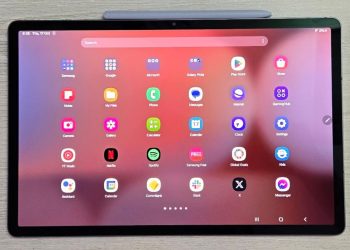
Google has started rolling out a new notification system for Android, aiming to fix one of the biggest everyday annoyances for smartphone users: nonstop, chaotic alerts. Instead of letting every message, promo, or app ping interrupt you throughout the day, the update introduces smarter controls powered by on-device AI that decide what deserves attention and what can quietly wait in the background.

One of the biggest changes is an AI summary tool that compresses long conversations or cluster-style notifications into a single, clean overview. So instead of ten messages showing up separately, you’ll get one neatly built summary that tells you who said what and what the conversation is roughly about. It saves time, reduces overwhelm, and helps you understand the context without scrolling through a dozen alerts.

Google has also revamped how the phone sorts different types of notifications. Alerts that rarely matter — things like ads, store offers, or low-priority app reminders — are now automatically grouped or muted. You’ll still find them if you look, but they won’t constantly fight for your attention at the top of your screen. This system becomes more accurate over time as it learns your habits, meaning the phone gradually gets better at understanding which alerts you usually care about.

Alongside these changes, the update adds improvements to customization. Notification controls are easier to adjust, icon theming has expanded, and dark mode now looks more consistent across apps. For families, certain devices also gain refreshed parental-control tools, making it easier for parents to manage what kids see and when they receive notifications.

Taken together, the update signals Google’s push toward reducing digital noise. Instead of treating every alert equally, Android is shifting toward a more mindful approach — showing you the things that matter, keeping the rest quiet, and giving you a cleaner, calmer phone experience throughout the day.

Tags: AI securityAI SummariesAndroidAndroid customizationAndroid featuresAndroid updatedigital wellbeingFraud PreventionGoogle AIGoogle Messagesmobile AI toolsmobile security 2025mobile software updatenotification filteringnotification systemOn-Device AIphishing protectionphone organizationproductivity toolsquiet notificationsScam Detectionsmartphone experiencesmartphone safetyspam SMSUser Experience
ShareTweet
sadaf

sadaf

Related Posts

Ai

Why your phone’s third lens is probably useless

by administrator
2026-01-14
New Galaxy Tablet Aims to Beat the iPad on Everyday Features and Price
Samsung

New Galaxy Tablet Aims to Beat the iPad on Everyday Features and Price

by sadaf
2026-01-04
A Well-Rounded OLED TV: LG C5 Brings Strong Performance Across the Board
Technews

A Well-Rounded OLED TV: LG C5 Brings Strong Performance Across the Board

by sadaf
2026-01-04
How iOS 27 Might Make Your iPhone Smarter and More Personal
Apple

How iOS 27 Might Make Your iPhone Smarter and More Personal

by sadaf
2026-01-04
Third One UI 8.5 Beta May Arrive for Galaxy S25 Phones Next Week
Samsung

Third One UI 8.5 Beta May Arrive for Galaxy S25 Phones Next Week

by sadaf
2026-01-04
2026 EV Lineup: Exciting Electric Cars on the Way
Cars

2026 EV Lineup: Exciting Electric Cars on the Way

by sadaf
2026-01-04
Next Post
Flagship Power Without the Price: OnePlus Ace 6T Shows What 2025 Mid-Rangers Can Do

Flagship Power Without the Price: OnePlus Ace 6T Shows What 2025 Mid-Rangers Can Do

Leave a Reply Cancel reply

Your email address will not be published. Required fields are marked *

  • Trending
  • Comments
  • Latest
Xiaomi Watch S4 Review: Brilliant Display, Customization Power, and Solid Fitness Features Under €200

Xiaomi Watch S4 Review: Brilliant Display, Customization Power, and Solid Fitness Features Under €200

2025-05-26
Samsung Galaxy Z Fold 7: The Thinnest, Lightest Foldable with Cutting-Edge AI and Camera Tech

Samsung Galaxy Z Fold 7: The Thinnest, Lightest Foldable with Cutting-Edge AI and Camera Tech

2025-07-10
New AI-Powered Notification Organizer in Android 16

New AI-Powered Notification Organizer in Android 16

2025-07-08
PowerBeats Pro 2: Launch Date and Price Details Unveiled

PowerBeats Pro 2: Launch Date and Price Details Unveiled

2025-02-03
New OnePlus Open 2 leak hints at a camera feature other flagships lack

New OnePlus Open 2 leak hints at a camera feature other flagships lack

0
Xfinity, Metro customers face Samsung Galaxy S25 Ultra activation problems

Xfinity, Metro customers face Samsung Galaxy S25 Ultra activation problems

0
Starting tomorrow, Apple might have to raise iPhone prices in the U.S.

Starting tomorrow, Apple might have to raise iPhone prices in the U.S.

0
Four Years Later, 60fps Bloodborne Patch Gets Taken Down By Sony

Four Years Later, 60fps Bloodborne Patch Gets Taken Down By Sony

0

MS Office LTSC 64bits ISO File Google Drive v16.90 (RARBG) To𝚛rent

2026-01-21

RedMagic 11 Air Goes Global: 7,000 mAh Battery Gaming Phone Launches on January 29

2026-01-21

Microsoft MS Office ARM ODT Reddit {RARBG} Magnet Link

2026-01-21

Microsoft Microsoft 365 LTSC Pro Plus ARM Preactivated All-In-One Insider Ultra-Lite Edition [CtrlHD] To𝚛rent Dow𝚗l𝚘ad

2026-01-21
iTDAY

ITDAY is a technology-focused platform covering the latest tech trends, news, and innovations in the worldwide. It likely provides articles, reviews, and insights on advancements in the tech industry.

© 2025 itDay - All rights reserved for the website of the latest technologies in the World.

Welcome Back!

Login to your account below

Forgotten Password?

Retrieve your password

Please enter your username or email address to reset your password.

Log In

Add New Playlist

No Result
View All Result
  • Smartphone
  • Technews
    • Camera
    • Gadjet
    • Laptop
    • PC
    • Tablet
    • Wearable
  • PC
  • Podcast
  • Videos
  • Games

© 2025 itDay - All rights reserved for the website of the latest technologies in the World.